Key Takeaways: mSpy offers the best balance of geofencing and activity records, Spynger is a focused Android-first option, and SpyX supports mixed mobile monitoring needs. Compare installation requirements, platform limits, billed totals, renewals, and refund exclusions before buying. Use detailed monitoring only on a child’s device you manage lawfully or with informed adult consent.
A weak monitoring app can show stale positions, miss a useful alert, collect unnecessary private information, or renew at a total the buyer did not expect. The biggest differences are not the length of the feature lists; they are device compatibility, setup requirements, data access, and whether a simpler family-location tool would solve the same problem.
This comparison separates installed monitoring apps from public-record lookup services and treats trial, introductory-offer, and refund language as different promises. A public demo can show how a dashboard is organized, but it is not a functional trial and cannot establish GPS accuracy, battery use, alert speed, or long-term reliability. Documented features are therefore separated from measured performance claims.
Best Mobile Spy Apps: Quick Comparison Table
| Name | Best For | Standout Feature | Free Trial/Refund | Rating | Visit |
|---|---|---|---|---|---|
 mSpy |
Detailed parental monitoring | Geofencing and activity dashboard | 14-day money-back guarantee. | 4.8/5 | Visit |
 Spynger |
Authorized Android-first monitoring | Location and communication records | 14-day money-back guarantee. | 4.7/5 | Visit |
 SpyX |
Parental phone activity review | Dashboard with location and app records | 15-day money-back guarantee. | 4.6/5 | Visit |
 xMobi |
Authorized Android monitoring | Dashboard access to supported records | 14-day money-back guarantee. | 4.5/5 | Visit |
 Spokeo |
US reverse phone and people searches | Aggregated public-record reports | 7-day introductory offer. | 4.4/5 | Visit |
 uMobix |
Android activity visibility | Consolidated browser dashboard | 2-day trial for $1. | 4.3/5 | Visit |
 ClevGuard |
Parental monitoring through KidsGuard Pro | Screen, app, and location reports | 30-day money-back guarantee. | 4.2/5 | Visit |
 FlexiSPY |
Advanced authorized monitoring | Broad records on supported configurations | 14-day money-back guarantee. | 4.1/5 | Visit |
Our Testing Methodology
I compared each product against the same practical criteria: platform support, setup requirements, useful location tools, communication and app coverage, device limits, billing clarity, trial or refund terms, privacy guidance, and available support. Public demonstrations helped assess dashboard organization, but a demo cannot prove GPS precision, battery impact, detection rates, alert speed, or long-term reliability. Those results are not inferred here.
Installed monitoring products lost ground when platform limits or consent requirements were unclear. Spokeo was scored as a US identity-lookup service, not as a live phone tracker. Actual results vary with the phone, operating system, permissions, account settings, region, network connection, and installation method. Because longer plans are usually prepaid, the billed total, automatic-renewal date, cancellation path, and refund exclusions matter more than a large monthly-equivalent figure.
List of Best Mobile Spy Apps for Android and iPhone
1) mSpy
mSpy is the most balanced choice here for parents who need location context alongside selected device-activity records. Its dashboard combines location history, geofences, browsing details, messages, and other supported categories, but the exact view depends on the phone, operating system, permissions, and setup method. Android generally offers the deeper monitoring path; iPhone coverage varies more sharply.
That breadth is useful when a family has a defined safety concern, such as repeated missed check-ins or risky online contact. It is excessive for routine reassurance. Use mSpy only on a child’s device you own and manage where lawful, or with the informed consent of an adult device user. This review evaluates documented capabilities, setup limits, current pricing, and support terms rather than claiming unmeasured accuracy or battery results.
Features
- Geofencing: Create named safety zones and review supported entry or exit events instead of watching a map continuously.
- Location dashboard: Review current or recent positions when the supervised phone has suitable permissions, connectivity, and location services.
- Keyword alerts: Supported configurations can flag selected words so a parent can focus on defined risks rather than reading every interaction.
- Screen and activity records: Android coverage may include screenshots or app-use evidence, with availability changing by device and software version.
- Communication records: Calls, texts, and selected messaging-app data can appear when the chosen platform and setup support them.
- Cross-platform setup: Android and iPhone routes are available, but they do not provide identical access and should be compared before purchase.
Pros
- Geofences connect location records to practical places such as home or school.
- One browser dashboard brings several supported safety signals together.
- Current plan totals and refund timing are stated more clearly than many rivals.
- Separate Android and iPhone setup routes give families options across platforms.
Cons
- iPhone depth depends heavily on the selected synchronization or installation method.
- One-device subscriptions become costly for households managing several phones.
- The amount of private data available can exceed what routine family safety requires.
Pricing
mSpy costs $48.99 for one month. Longer prepaid terms reduce the monthly equivalent, and each plan covers one device.
| Plan | Total Billed | Monthly Equivalent | Coverage |
|---|---|---|---|
| One month | $48.99 | $48.99 | One device |
| Three months | $83.97 | $27.99 | One device |
| 12 months | $139.92 | $11.66 | One device |
Free Trial/ Refund: For technical issues the support staff cannot fix, mSpy may provide a full refund. Eligible requests must be made within 14 days of purchase under the refund policy.
Bottom Line: mSpy is the strongest all-round fit for families that need both geofencing and supported activity records. Its advantage is a broad, organized dashboard; its trade-off is that iPhone coverage varies by setup and the service can collect much more private information than a narrow safety goal requires.
14-day money-back guarantee.
2) Spynger
Spynger is a focused Android-first option for families that want location and communication records in one web account. It is easier to understand when judged as an installed monitoring product, not as a phone-number locator: the supervised device must meet the service’s setup and permission requirements before records can reach the dashboard.
The product suits a specific, disclosed monitoring need better than casual checking. Its public support material explains the 14-day refund window, but buyers should still confirm device compatibility and the full prepaid charge before ordering. Use it only on a child’s device you own and manage where lawful, or with the adult user’s informed consent. No documented feature should be treated as proof of real-world alert speed or GPS precision.
Features
- GPS records: View supported current or recent positions when location access, connectivity, and device settings allow updates.
- Call and text history: Review documented communication records from the web dashboard on compatible Android configurations.
- Messaging-app coverage: Selected social and chat records may be available, with coverage changing as apps and Android versions change.
- Media and files: Supported photos, videos, or stored files can help explain a specific safety concern without handling the phone repeatedly.
- Browser dashboard: Collected categories are organized remotely after the authorized installation and synchronization steps are complete.
- Account-based review: Parents can return to the same dashboard for later records rather than treating each location check as a separate task.
Pros
- Android-first positioning makes its intended use easier to assess.
- Location and communication records appear in a single browser dashboard.
- The support center states a 14-day refund-request window.
- Longer prepaid terms reduce the advertised monthly equivalent.
Cons
- It is not a remote locator that works from a phone number alone.
- Public compatibility and feature-detail pages are less transparent than the strongest rivals.
- A one-device plan may not suit families supervising several phones.
Pricing
Spynger costs $45.49 for one month. Its three- and 12-month plans are prepaid and reduce the monthly equivalent for one device.
| Plan | Total Billed | Monthly Equivalent | Coverage |
|---|---|---|---|
| One month | $45.49 | $45.49 | One device |
| Three months | $78.00 | $26.00 | One device |
| 12 months | $129.96 | $10.83 | One device |
Free Trial/ Refund: Spynger does not list a standard free trial. Eligible purchases may receive a full refund when requested within 14 days, subject to the refund policy.
Bottom Line: Spynger is best for an authorized Android-first setup where location and communication records matter more than cross-platform flexibility. Its focused dashboard is the main advantage. The weaker point is public detail: buyers should confirm exact device support, feature coverage, and the billed total before committing to a prepaid term.
14-day money-back guarantee.
3) SpyX
SpyX targets parents who want a broad overview of mobile activity across Android and Apple devices. The dashboard can combine location, app, browser, and communication records on supported setups, but feature parity should not be assumed. Apple access and update frequency may depend on credentials, synchronization, and the device state rather than matching an Android installation.
This makes SpyX a reasonable comparison choice for a mixed-device household, provided the family checks the exact compatibility path first. It should not be bought for covert use or treated as a phone-number tracking service. Use detailed monitoring only on a child’s device you own and manage where lawful, or with informed adult consent. Documented coverage does not establish measured accuracy, battery impact, or delivery speed.
Features
- Location history: Review available position records, subject to the target phone’s permissions, connectivity, and operating-system limits.
- App activity: Supported configurations organize selected app records in a remote account for later review.
- Communication records: Calls, texts, contacts, or compatible chat data may be shown when the selected setup provides them.
- Browser information: Web history and related records can add context to a defined online-safety concern.
- Android and Apple routes: The service lists support across mobile platforms, although depth and setup differ.
- Central dashboard: Multiple supported record types are presented in one place instead of across separate utilities.
Pros
- Supports both Android and Apple-oriented monitoring paths.
- Combines location and app-related records in one dashboard.
- A 15-day refund period is longer than several 14-day policies in this list.
- Prepaid multi-month options reduce the displayed monthly equivalent.
Cons
- Android and iPhone features are not equivalent.
- The one-month entry price is among the higher options compared here.
- Buyers must check the purchase channel because refund handling can differ.
Pricing
SpyX costs $59.99 for one month. Prepaid three- and 12-month terms reduce the monthly equivalent.
| Plan | Total Billed | Monthly Equivalent | Coverage |
|---|---|---|---|
| One month | $59.99 | $59.99 | Plan-specific |
| Three months | $99.99 | About $33.33 | Plan-specific |
| 12 months | $149.99 | About $12.50 | Plan-specific |
Free Trial/ Refund: SpyX does not list a permanent free plan. Eligible purchases may be refunded within 15 days, subject to its policy and the original purchase channel.
Bottom Line: SpyX is a practical shortlist option for families comparing Android and Apple monitoring from one account. Its broad dashboard is useful, but platform parity is the key limitation. Confirm the exact iPhone or Android setup, supported records, purchase channel, and renewal total before paying for a longer term.
15-day money-back guarantee.
4) xMobi
xMobi is aimed at authorized phone monitoring where social, browser, location, and communication records need to be reviewed from one dashboard. It is not a remote lookup service: access depends on a compatible device, the required setup, and continuing permissions. The product lists Android and iPhone coverage, but available categories can differ by platform and software version.
Its pricing sits close to other full-monitoring tools, so the deciding issue is compatibility rather than the headline feature count. The short paid introductory offer is not the same as a free trial, and the refund policy includes conditions and a possible processing deduction. Use xMobi only on a child’s device you own and manage where lawful, or with the informed consent of an adult device user.
Features
- Location records: View available positions or routes when the supervised phone continues to supply location data.
- Calls and messages: Compatible setups can provide selected communication history for an authorized safety review.
- Social-app records: Supported social and messaging categories vary with the phone, operating system, and app version.
- Browser activity: Web-history records can help parents investigate a defined online risk.
- Media visibility: Selected photos, videos, or files may appear when the device and plan support them.
- Remote dashboard: Collected records are organized in a browser account after the required setup is completed.
Pros
- Covers several useful safety categories in one account.
- Lists monitoring paths for both Android and iPhone.
- Longer prepaid plans lower the advertised monthly equivalent.
- A short paid introductory offer can provide limited early access.
Cons
- The $0.99 one-day offer is paid and should not be described as a free trial.
- Eligible refunds may be reduced by a 9% processing deduction.
- Feature depth varies by device and setup, so the full list may not apply to one phone.
Pricing
xMobi costs $49.99 for one month. Longer prepaid plans lower the monthly equivalent, and one subscription covers one Android device.
| Plan | Total Billed | Monthly Equivalent | Coverage |
|---|---|---|---|
| One month | $49.99 | $49.99 | One Android device |
| Three months | $89.97 | $29.99 | One Android device |
| 12 months | $149.88 | $12.49 | One Android device |
Free Trial/ Refund: xMobi does not list a standard free trial. Some orders may begin with a $0.99 one-day paid offer. Eligible first purchases may be refunded within 14 days under the policy’s exclusions, and a 9% processing deduction may apply.
Bottom Line: xMobi is best considered when a family has confirmed that its phone and required safety records match the supported setup. The single dashboard is convenient, but the paid one-day offer and conditional refund terms deserve careful reading. Compare the billed total and platform-specific coverage before choosing a longer prepaid plan.
14-day money-back guarantee.
5) Spokeo
Spokeo is different from every installed monitoring app in this ranking. It is a US people-search and reverse-lookup service that can connect a phone number, name, email address, or street address with aggregated public-record information. It does not provide live GPS movement, read another phone’s messages, or turn a phone number into precise device coordinates.
That narrower role can still be useful when a family needs context about an unfamiliar caller or contact without installing software on anyone’s phone. Report completeness varies because public and commercial records can be outdated, missing, or associated with the wrong person. Spokeo also states that its reports are not consumer reports under the Fair Credit Reporting Act, so they should not be used for employment, tenant, credit, or similar eligibility decisions.
Features
- Reverse phone lookup: Search a US phone number for possible identity and contact associations in aggregated records.
- People search: Use a name and other known details to narrow possible public-record matches.
- Email lookup: Check whether an email address is associated with available profiles or contact details.
- Address search: Review property, location, and resident information that may appear in public or commercial sources.
- Report aggregation: Related records are grouped into a web report rather than requiring separate database searches.
- No device installation: A lookup does not require installing monitoring software on another person’s phone.
Pros
- Useful for investigating unknown callers without touching their device.
- Supports phone, name, email, and address search routes.
- Avoids the invasive permissions required by installed monitoring tools.
- The seven-day introductory offer lowers the initial cost of a short search need.
Cons
- Cannot provide live GPS movement or precise device coordinates.
- Records can be incomplete, outdated, or linked to the wrong person.
- The introductory offer converts to recurring membership unless canceled under the checkout terms.
Pricing
Spokeo may offer a $0.95 seven-day introductory period. The checkout page shows the recurring membership price that follows the introductory period.
| Plan | Total Billed | Renewal | Coverage |
|---|---|---|---|
| Seven-day introductory offer | $0.95 | Converts to recurring membership unless canceled | Search access |
| Membership | Shown at checkout | Recurring until canceled | Full public-record reports |
Free Trial/ Refund: Limited search previews may be free. The $0.95 seven-day introductory offer converts to a recurring membership unless canceled before it ends; checkout terms control refund eligibility.
Bottom Line: Spokeo is the best fit here for identifying an unfamiliar US caller or checking public-record context without installing an app. It is not a live tracker or device monitor. Its value comes from broad lookup routes, while record accuracy and recurring membership terms remain the main cautions.
7-day introductory offer.
6) uMobix
uMobix is strongest on Android, where its dashboard can combine location, calls, messages, browsing, app activity, and selected control features. An iPhone route is also offered, but buyers should expect a different setup and narrower access rather than assuming the Android feature list carries over. One subscription covers one supervised device.
The service suits parents who have a defined reason to review several types of activity and who can complete the authorized setup. It is a poor match for families that only need consensual location sharing. The current offer includes a short paid trial rather than a free plan, followed by subscription billing if the purchase is continued. Use it only on a child’s device you own and manage where lawful, or with informed adult consent.
Features
- Location visibility: Review supported GPS records when device permissions, connectivity, and system settings allow updates.
- Calls and messages: Android configurations may provide communication history and selected messaging-app records.
- App and browser activity: The dashboard can organize supported online and app-use categories for focused review.
- Android activity depth: The documented Android route generally exposes more categories than the iPhone option.
- Selected restrictions: Compatible Android setups may include remote controls or blocking options, depending on version and permissions.
- Web dashboard: Records from one subscribed device are consolidated in an account accessible from a browser.
Pros
- Broad Android coverage brings several record types into one dashboard.
- A two-day paid trial offers a lower-cost way to inspect the service.
- Current plan totals are published for one-, three-, and 12-month terms.
- A 14-day money-back period is available for qualifying purchases.
Cons
- The short trial costs $1 and is not a free trial.
- iPhone coverage is narrower and setup-dependent.
- One subscription covers one device, increasing the cost for larger families.
Pricing
uMobix costs $49.99 for one month. Three- and 12-month plans are prepaid and reduce the monthly equivalent for one device.
| Plan | Total Billed | Monthly Equivalent | Coverage |
|---|---|---|---|
| One month | $49.99 | $49.99 | One device |
| Three months | $89.97 | $29.99 | One device |
| 12 months | $149.88 | $12.49 | One device |
Free Trial/ Refund: uMobix offers a two-day trial for $1. Eligible purchases may receive a full refund for technical issues support cannot resolve when the request is submitted within 14 days of purchase.
Bottom Line: uMobix is a strong Android-focused choice for parents who need several activity categories in one dashboard. Its two-day paid trial provides a lower-cost starting point, but iPhone limitations and one-device licensing reduce its value for mixed-platform or larger households. Confirm renewal timing before the trial or subscription continues.
2-day trial for $1.
7) ClevGuard
ClevGuard’s KidsGuard Pro is designed for parental monitoring across location, screen, app, browser, and communication categories. The company offers several products and platform editions, so buyers need to match the exact KidsGuard product to the supervised phone rather than assuming every advertised feature is included in one plan. One license generally covers one device.
A public demo is useful for understanding the dashboard layout, but it is not a functional trial and cannot establish real-world reliability. The conditional 30-day refund window is longer than most policies in this comparison, although technical troubleshooting and other exclusions still apply. Use detailed monitoring only on a child’s device you own and manage where lawful, or with the informed consent of an adult user.
Features
- Location and geofences: Supported editions can show location records and defined-zone activity when the device supplies timely data.
- Screen reports: Android-oriented coverage may include screenshots or other screen evidence on compatible configurations.
- App activity: Review supported app-use and social records from the KidsGuard dashboard.
- Communication history: Calls, texts, contacts, or selected chat records depend on the purchased edition and setup.
- Browser records: Web activity can provide context for a specific online-safety concern.
- Public dashboard demo: Buyers can inspect the interface before purchase without treating the demo as a functional device trial.
Pros
- The public demo makes dashboard organization easier to assess before purchase.
- KidsGuard Pro covers location, app, screen, and communication categories.
- The conditional 30-day refund window is longer than most rivals listed here.
- Current one-, three-, and 12-month billed totals are published.
Cons
- The demo does not test compatibility, alert timing, or GPS performance on a real phone.
- Multiple ClevGuard products and editions make feature comparison less straightforward.
- One-device licensing can raise the cost for households with several children.
Pricing
KidsGuard Pro costs $49.99 for one month. Its three-month and annual plans are prepaid and reduce the monthly equivalent for one device.
| Plan | Total Billed | Monthly Equivalent | Coverage |
|---|---|---|---|
| One month | $49.99 | $49.99 | One device |
| Three months | $75.99 | $25.33 | One device |
| 12 months | $139.99 | $11.66 | One device |
Free Trial/ Refund: ClevGuard provides a public demo rather than a functional free trial. Eligible purchases may receive a full refund within 30 days when support cannot resolve a qualifying technical issue, subject to policy exclusions.
Bottom Line: ClevGuard is worth considering when a buyer wants to inspect a dashboard demo before selecting a KidsGuard edition. Its conditional 30-day refund window is a notable advantage. The main caution is product complexity: confirm the exact platform edition, supported features, one-device limit, and troubleshooting requirements before purchase.
30-day money-back guarantee.
8) FlexiSPY
FlexiSPY is the specialist option in this list. It emphasizes extensive device records and advanced capabilities on supported Android and iPhone configurations, but some of its most intrusive functions can require elevated device access and more complicated setup. That makes it less suitable for a family that only needs arrival alerts, screen-time rules, or transparent location sharing.
The plan range also needs close reading because Lite, Premium, and Extreme do not include the same capabilities. Families should identify the exact safety goal, confirm operating-system support, and compare the billed term before choosing a tier. Use FlexiSPY only on a child’s device you own and manage where lawful, or with an adult device user’s informed consent. Avoid collecting calls, messages, or media merely because the dashboard makes them available.
Features
- Location records: Review available device positions when the configuration and permissions support ongoing updates.
- Communication history: Compatible plans and devices can provide calls, texts, contacts, or selected messaging records.
- Media and app activity: Supported configurations can organize photos, files, browsing, and application information.
- Advanced plan tiers: Premium and Extreme add capabilities beyond Lite, so feature availability depends on the purchased plan.
- Android and iPhone support: Both platforms are listed, but setup difficulty and available functions vary substantially.
- Web account: Captured records are presented remotely after the authorized device setup is complete.
Pros
- Offers one of the broadest documented feature sets for compatible devices.
- Multiple plan tiers let buyers avoid paying for every advanced function.
- Supports both Android and iPhone configurations.
- A 14-day refund window is available for qualifying first purchases.
Cons
- Advanced capabilities may require elevated device access and complicated setup.
- Premium and Extreme pricing can be difficult to justify for ordinary family safety.
- Its extensive data access creates a high privacy burden for the account holder.
Pricing
FlexiSPY starts with Lite at $49.95 per month. Premium and Extreme cost more and add broader monitoring features.
| Plan | Total Billed | Monthly Equivalent | Coverage |
|---|---|---|---|
| Lite | $49.95 monthly | $49.95 | Entry feature set |
| Premium | $79.00 monthly | $79.00 | Expanded feature set |
| Extreme | $119.00 monthly | $119.00 | Highest feature tier |
Free Trial/ Refund: FlexiSPY does not offer a permanent free plan. Eligible first purchases may be refunded within 14 days when the request meets the policy’s technical and deactivation conditions.
Bottom Line: FlexiSPY is best reserved for a lawful, clearly defined need that genuinely requires advanced records. Its breadth and plan choice are the strengths; setup complexity, privacy exposure, and higher-tier cost are the trade-offs. Most families seeking simple location sharing or screen-time limits should choose a less invasive product.
14-day money-back guarantee.
What Should You Check Before Choosing the Best Mobile Spy Apps?
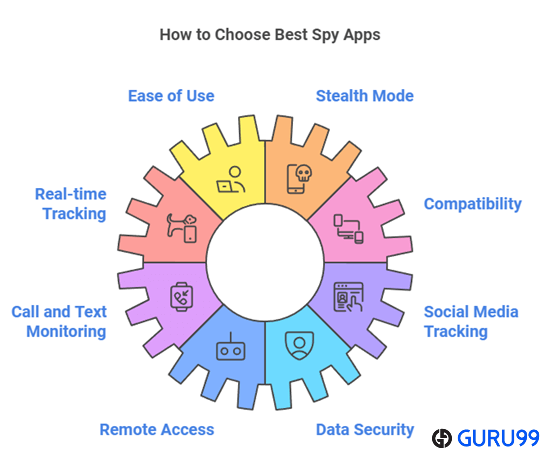
Start with the exact job: shared location, a one-time phone-number request, identity verification, or broader parental controls. These are different products. Check whether the child uses Android or iPhone, how many devices the plan covers, and what happens when location permission is removed. For a broader map-focused shortlist, see our best tracking apps for Android and iPhone. Families that also need screen-time rules and web filtering can compare the best parental control apps. Pay attention to trial renewal language and use the least intrusive feature set that solves the safety problem.
Are Phone Trackers and Monitoring Apps Legal and Safe?
They can be lawful when a parent manages an owned child’s device under applicable rules, or when an adult device user gives informed consent. A marketing claim about hidden operation does not create legal authority. Avoid installing monitoring software on a partner, employee, or unrelated adult without clear permission. Phone-number lookup services have a different limit: they may organize public records, but they are not consumer-reporting tools for employment, housing, credit, or insurance decisions. Family rules should state who can see location, which records are collected, how long they are kept, and when monitoring will end.
How These Apps Are Changing in 2026
Permission transparency matters more now because Android and iPhone increasingly restrict background access. That makes the setup method part of the product, not a footnote. Family locators are adding contextual place alerts, driving information, SOS tools, and household accounts, while parental-control services are moving toward narrower risk alerts instead of constant manual review. App-store privacy disclosures also make data collection easier to compare, though a disclosure does not prove good handling. Expect feature lists to diverge further between Android and iOS. Families should review permissions after operating-system updates and should scale back monitoring when a child becomes older or the original concern no longer exists.
Verdict
The best mobile spy apps match the intended phone, family purpose, budget, and consent rules. These three options lead this comparison for distinct reasons.
- mSpy ranks first for detailed parental monitoring because of its geofencing and activity dashboard.
- Spynger ranks second for authorized Android-first monitoring because of its location and communication records.
- SpyX ranks third for parental phone activity review because of its dashboard with location and app records.
FAQs
Yes. Several support both platforms, but available records change with the phone, permissions, plan, region, account type, installation method, and account configuration chosen during setup.
No. Tracking or monitoring another adult normally requires ownership authority and informed consent. Check local law and platform rules in your jurisdiction before collecting location or communications.
No. Some have permanent free tiers, while others provide a demo, low-cost trial, in-app purchase, or conditional refund instead of free service or unrestricted access.
No. People-search reports organize available records and cannot follow a device. Live maps require an installed app or a location request that the recipient approves.
No. Start with shared location, check-ins, and clear rules. Add broader controls only for a defined concern, and revisit the arrangement as the child matures.