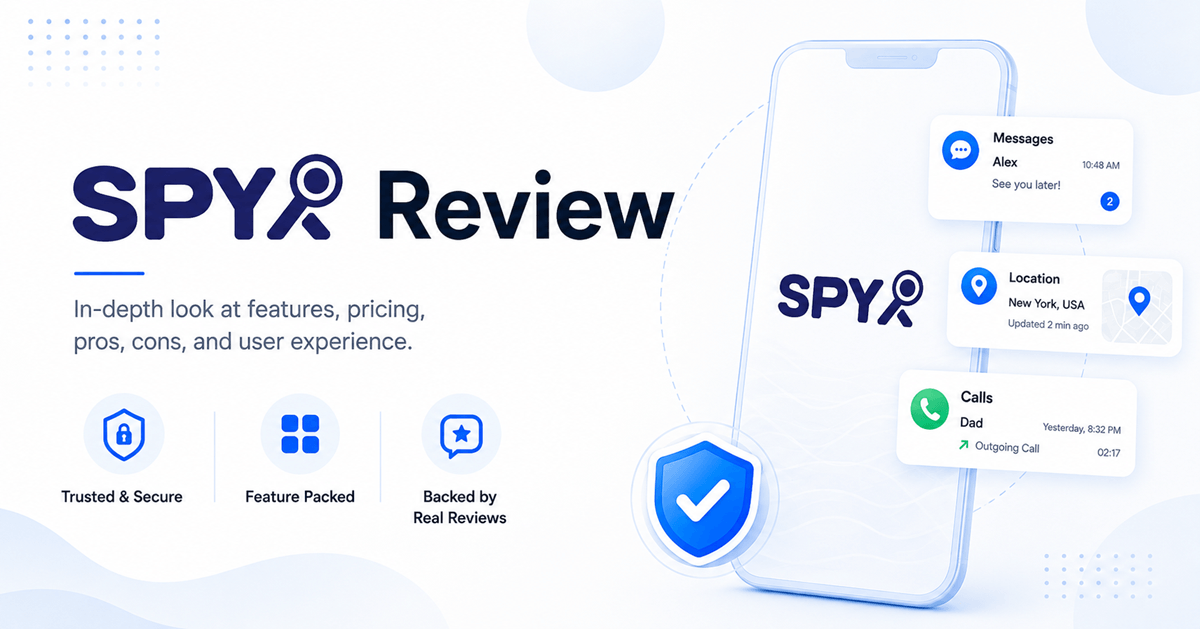
SpyX is a commercial phone-monitoring service that markets several cloud-based setup methods for current iPhone and Android versions. The company claims access to calls, messages, GPS, social activity, and media, but exact coverage depends on platform, credentials, and setup. Its 15-day refund window is strict and can exclude orders once target data has been acquired.
SpyX promotes a simpler setup than many monitoring apps, including cloud-based methods that may avoid installing a visible app. Those claims are attractive, but they need careful reading. Remote does not mean that a phone number unlocks a device. Account credentials, lawful access, platform compatibility, and security verification can still be required.
For this review, I examined SpyX’s documented compatibility, setup methods, subscription agreement, refund policy, and interface examples. I did not connect SpyX to a controlled iPhone or Android phone, so broad claims such as 40-plus data types, no installation, and remote setup remain vendor claims rather than measured results.
SpyX review: Our verdict
SpyX appears to be a legitimate commercial service, but its broad remote-monitoring claims deserve more caution than the marketing copy suggests. The company publishes billing, cancellation, compatibility, support, and refund information. It does not make lawful access optional.
The service advertises support for current iOS and Android versions and says some setup methods avoid rooting or jailbreaking. The exact data available can vary sharply between cloud-based account access and an installed device connection. Buyers should get written confirmation for the specific phone and feature they need.
The refund policy creates purchase risk. A request must meet the 15-day window, and the policy says a refund can be refused once target data has been acquired. That makes a long prepaid plan hard to recommend before compatibility is proven.
Overall rating: 7.4/10
Best for: Authorized buyers who need broad phone records and can verify the exact setup first
Main drawback: Expansive marketing claims, platform-dependent coverage, and a restrictive refund policy
Pros
- Several setup methods are presented, including options that do not require root or jailbreak.
- Dashboard categories include location, calls, messages, social activity, and media.
- Published subscription and refund terms explain automatic renewal and device limits.
Cons
- One package normally covers one target device.
- Renewal pricing may differ from the initial promotional price.
15-Days Money-Back Guarantee
What is SpyX?
SpyX is a subscription monitoring service with a browser dashboard. It markets cloud-based and device-linked methods for iPhone and Android. The selected method determines what records can appear. The service is not a carrier lookup and cannot lawfully unlock a stranger’s phone from a number.
How SpyX works
- Create an account, choose the correct platform, and select a recurring plan for one target device.
- Follow the setup path offered for that device. This may require account credentials, security verification, settings access, or installation.
- Review synchronized records in the browser dashboard and check each timestamp.
- Confirm renewal status in the account. SpyX says cancellation should be completed at least 24 hours before the term ends.
Cloud-based setup can sound fully remote, but Apple and Google security controls can require two-factor verification or direct access. The availability of one setup method does not mean every advertised feature will work without installation.
SpyX installation guide
SpyX presents more than one setup method, and the correct path depends on the phone and account. The no-app option should not be confused with phone-number access. Cloud setup can still require valid credentials, security verification, and lawful control of the account.
- Create a SpyX account and select the operating system of the supervised phone.
- Choose a subscription and confirm that it covers the device and feature you need.
- Follow the setup path displayed in the account. It may use a cloud connection, a QR code, or an installed phone component.
- Complete any registration code, account login, two-factor prompt, or permission request required by that method.
- Open the dashboard and confirm which record categories have synchronized.
Do not assume that every setup avoids installation. The instructions include a QR-code download path, while SpyX also advertises cloud-based methods. Ask support to identify the exact method for your phone before purchasing a long plan.
SpyX features reviewed
Installed apps and app usage
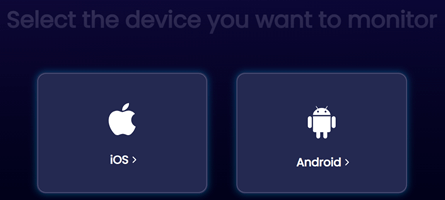
SpyX advertises a list of installed apps and, on supported setups, activity or usage information. This can help a parent identify unfamiliar apps, but it does not explain what happened inside each app. App updates, permissions, and the selected connection method can change the available detail.
Text messages and phone calls
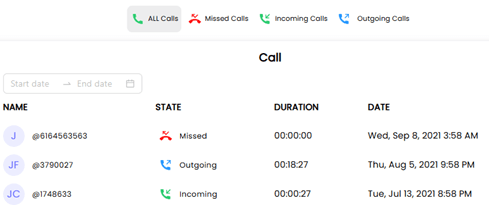
The dashboard markets access to SMS records and call details such as contact, direction, time, and duration. Claims about listening back to every conversation should not be treated as a standard promise. Call recording laws also vary, so written confirmation and legal authorization are essential.
Photos, videos, emails, and FaceTime records
SpyX lists photos, videos, emails, and FaceTime-related records among its supported categories. Exact access depends on the phone and setup. A cloud connection may provide a different result from an installed Android connection, and no dashboard can recover media that never synchronized.
GPS location, history, and geofences
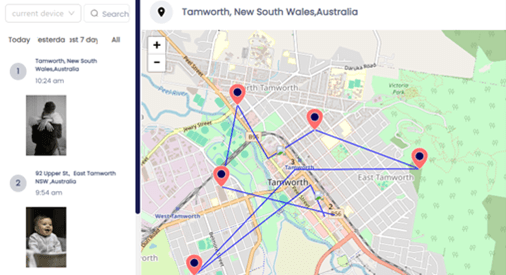
The location section advertises recent coordinates, route history, and geofence alerts. GPS accuracy and refresh timing depend on permissions, connectivity, the connection method, and the last successful synchronization. Check the timestamp before treating a pin as current.
Families that only need arrival alerts or shared maps should compare family tracking apps with clearer consent and fewer private-data risks.
Notes, reminders, and typed text
Supported setups may show notes, reminders, or keystrokes. These categories are highly sensitive and can expose health, school, financial, or account information that has nothing to do with the safety concern. Limit dashboard access and avoid collecting more than the situation requires.
Keylogger and social networks
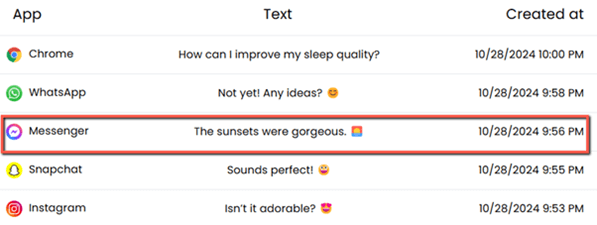
SpyX markets a keylogger and chat records from supported social apps. The exact coverage can vary by operating system, app version, and setup path. No buyer should assume that every WhatsApp, Snapchat, Instagram, Facebook, LINE, or Discord conversation will appear.
Screen time and Wi-Fi controls
The available screenshots show app-usage and Wi-Fi control sections, but SpyX is not as focused on everyday filtering and schedules as conventional parental control products. Confirm whether the required control is available for the exact phone.
For routine screen-time limits, app approval, and web filtering, compare parental control apps before choosing a monitoring service.
Remote setup and no-notification claims
SpyX advertises remote, cloud-based, and no-notification methods for some devices. Those statements describe possible setup paths, not a universal guarantee. Apple or Google security checks can require two-factor verification or direct access, and some Android features may rely on an installed component.
What is impressive about SpyX?
SpyX covers more categories than a basic family locator. Its dashboard is designed to bring calls, messages, location, app activity, and media into one account. The company also advertises current iPhone and Android compatibility and setup methods that avoid rooting or jailbreaking.
The range is useful only if the required category works on the exact phone. The strongest part of SpyX is the breadth of its dashboard, not the promise that every device will deliver every record.
What is not so impressive?
The marketing does not make platform differences clear enough. Claims of remote setup, no app, live location, and more than 40 data types can sound universal even though access depends on credentials, permissions, security settings, and the chosen method.
The refund policy is also restrictive. A refund can be denied after target data has been acquired, and many compatibility, credential, connectivity, and buyer-error situations are excluded. SpyX also gives less attention to web filtering and routine time limits than dedicated parental control apps.
Best SpyX alternatives
| Alternative | Best for | Important difference |
|---|---|---|
| mSpy | Detailed Android monitoring with a mature dashboard | Android installation needs physical access; standard plans cover one device |
| uMobix | Broad Android activity records and a public dashboard demo | One-device licensing and strict 14-day refund conditions |
| KidsGuard | Another phone-monitoring option with location and communication records | Compatibility and available features must be checked for the selected product version |
None of these tools should be selected from a feature count alone. Compare the exact phone, required permission, renewal terms, and refund exclusions before buying.
SpyX pricing and refund policy
SpyX offers recurring plans for one target device. Longer terms lower the monthly equivalent but require a larger upfront charge. Prices, promotions, and renewal rates can differ, so verify the final total and later renewal amount at checkout.
| Plan | Billed amount | Monthly equivalent | Device coverage |
|---|---|---|---|
| 1 month | $49.98 | $49.98 | 1 device |
| 3 months | $84.96 | $28.32 | 1 device |
| 12 months | $139.92 | $11.66 | 1 device |
Free Trial/ Refund: No standard free trial. Eligible first purchases may request a refund within 15 days.
Subscriptions renew automatically unless canceled at least 24 hours before the term ends. The renewal price may differ from the introductory price. The refund policy excludes many cases involving compatibility, missing access or credentials, connectivity, buyer error, and acquired target data. A refund decision may take up to 15 business days.
15-Days Money-Back Guarantee
Customer support and cancellation
SpyX provides account and support channels for setup, cancellation, and refund requests. Use the official refund system, keep screenshots of the selected plan and compatibility promises, and retain the cancellation confirmation. Deleting an app or disconnecting an account does not automatically cancel billing.
SpyX customer experience
Setup and support experiences can differ because SpyX offers several connection methods. A buyer using a compatible cloud path may have a much easier setup than someone expecting an unsupported record category. Save any written compatibility promise and keep the cancellation confirmation.
Deleting an installed component or disconnecting an account does not automatically stop billing. Use the subscription controls or support process and cancel at least 24 hours before renewal.
Is SpyX safe and legal?
SpyX should only be connected to a phone you are legally authorized to supervise. Monitoring another adult without informed permission can violate privacy, interception, or computer-access laws. No-install technology and a hidden notification do not create consent.
Who should use SpyX?
SpyX may suit a parent who has lawful access, needs detailed records, and has confirmed which setup method supports the required feature. It is a poor choice for number-only tracking, guaranteed invisible access, monitoring several phones under one plan, or buyers who need a forgiving refund policy.
How we evaluated SpyX
I evaluated SpyX on documented platform claims, purchase transparency, billing and refund risk, feature breadth, privacy impact, and relevance to parental safety. I did not convert marketing terms such as remote setup, no app, or 40-plus data types into tested facts. Physical-device testing is still needed to measure accuracy, delays, completeness, and battery impact.
Final verdict: Is SpyX worth it?
SpyX has the structure of a legitimate monitoring service, but the widest claims should be approached carefully. Confirm the exact phone, connection method, and required feature before paying. A short initial commitment is safer because the refund policy is strict and may exclude accounts that have already received target data.
15-Days Money-Back Guarantee