uMobix is a legitimate commercial monitoring service, not a phone-number tracking trick. Its strongest coverage is on Android, where it can report calls, texts, location, browser history, typed text, and activity from supported social apps. One subscription covers one phone. Physical access is required for Android installation, and the refund policy has strict exclusions.
uMobix sits closer to a monitoring app than a conventional parental control tool. It collects detailed phone activity and presents it in a web dashboard. That can help in a serious child-safety situation, but it can also collect far more personal information than many families need.
For this uMobix review, I checked the current product pages, Android compatibility information, public dashboard demo, recurring billing terms, refund policy, and the supplied product screenshots. I did not install uMobix on a child’s phone or run physical-device accuracy and battery tests. Feature availability can change with the phone model, operating system, permissions, and account setup.
uMobix review: Our verdict
uMobix is legitimate, but it is not the right parental control app for every household. uMobix is designed to collect phone records after it has been installed or linked through an authorized setup. It cannot unlock a stranger’s phone from a phone number.
The Android product has the clearest public documentation and the broadest feature list. The current website describes calls, SMS, location history, browser activity, app lists, screenshots, media, keylogging, and remote restrictions. iPhone coverage is less clearly documented on the current public site and may rely on Apple account access or backups. Confirm the exact iPhone setup with support before purchasing.
I would consider uMobix only when a parent has a specific safety concern and simpler controls are not enough. Routine location sharing, screen-time limits, and open conversations are less invasive. If detailed monitoring is justified, agree on the rules where age and circumstances allow, protect the dashboard account, and review whether the need still exists.
Overall rating: 8.4/10
Best for: Authorized Android monitoring where detailed activity records are genuinely needed
Main drawback: One-device licensing, automatic renewal, strict refund exclusions, and uneven platform coverage
Pros
- Android coverage includes location, messages, calls, media, browser activity, and supported social apps.
- Reports are organized in one browser-based dashboard accessible from the parent’s own device.
- Published legal, recurring billing, cancellation, and refund terms are available before checkout.
Cons
- One subscription monitors only one device at a time.
- iPhone capabilities are less clearly documented than Android capabilities on the current website.
14-Days Money-Back Guarantee
What is uMobix?
uMobix is subscription software for monitoring a supervised phone. After setup, supported records are sent to an online account that the subscriber can open in a browser. The product is marketed mainly to parents, though the amount of information it can collect makes ownership and consent especially important.
The service is not a mobile carrier and does not provide cellular data, antivirus protection, or a family phone plan. Some claims in older reviews mix those unrelated services into the description. uMobix is monitoring software. Its value depends on whether the required feature works on the exact supervised device.
How uMobix works
- Create an account and select a subscription. The published plans cover one supervised device.
- Complete the authorized setup. Android installation requires physical access. Apple-related setups may require current account credentials, backup access, and two-factor authentication.
- Open the web dashboard. Supported records appear after the supervised device connects and sends data.
- Review permissions and renewal settings. Operating system updates can interrupt collection, and subscriptions renew until canceled.
uMobix says Android data normally updates every five minutes, though real timing depends on internet access, permissions, battery controls, and the phone’s state. Treat dashboard timestamps as reports from a device, not guaranteed live evidence.
What uMobix cannot do
uMobix cannot track a phone simply because you know its number. Continuous monitoring depends on an installed or linked setup, valid access, an internet connection, and supported software. Services that promise full message access from a phone number alone are making a different and far less credible claim.
It also cannot guarantee that every record will arrive. A powered-off phone, lost connection, revoked permission, security scan, operating system update, factory reset, or changed Apple account setting can stop synchronization. Historical records only exist if the device sent them while the service was connected. The dashboard cannot recreate calls, messages, photos, or locations that were never collected.
The software does not replace a conversation with a child, an emergency service, a mobile carrier, or a cybersecurity product. It reports activity and applies certain Android controls. It does not judge context reliably. A late location update may look alarming when the phone has simply lost signal, and a captured keyword can be harmless when read inside the full conversation.
Dashboard and platform differences
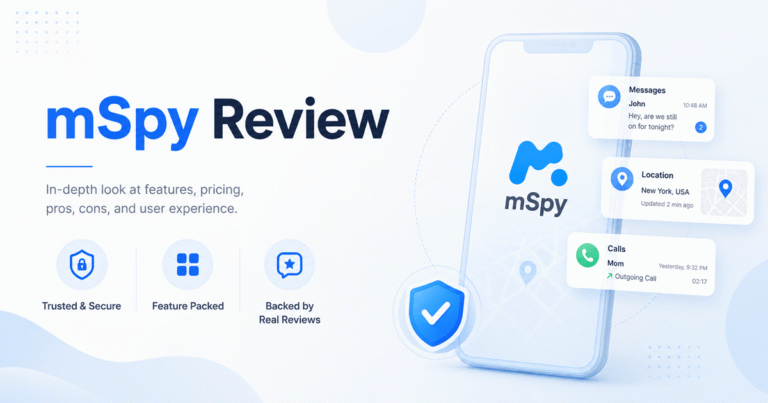
The dashboard groups activity into sections rather than forcing the parent to work directly on the supervised phone. The public demo is useful because it shows the layout without requiring a purchase. It does not prove how quickly or completely a real phone will send records.
iPhone dashboard
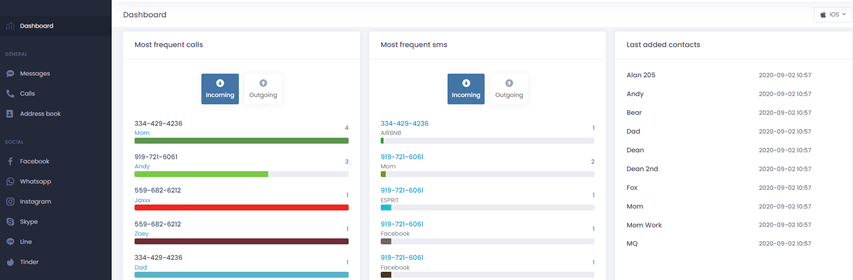
The supplied iPhone screenshot shows an account-style dashboard. Current public compatibility material gives far more detail for Android, while the refund policy refers to iCloud credentials, backup access, and two-factor authentication. Buyers should ask support to confirm which iPhone records are available for their setup before ordering.
Android dashboard
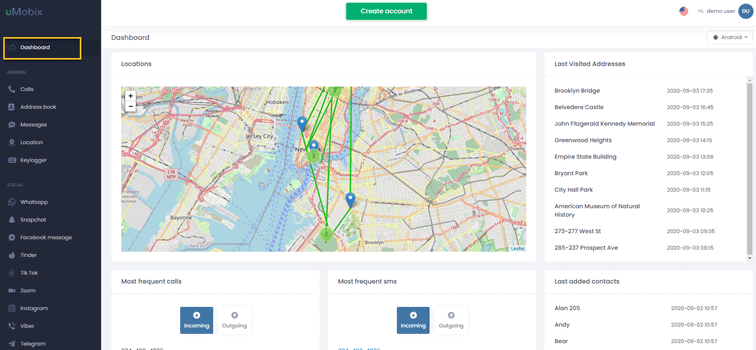
Android is the clearer choice for uMobix. The company publishes Android installation instructions and a long feature list. Some advanced functions may need elevated permissions or a rooted device, and the refund policy says advanced Android features can require rooting. Check this before assuming every listed tool works after a basic installation.
uMobix features reviewed
Calls, contacts, and text messages
uMobix says it can display incoming and outgoing call details, contact information, timestamps, and SMS records on supported Android phones. Deleted items may appear if the app collected them before removal. It cannot reconstruct information that never reached the dashboard.
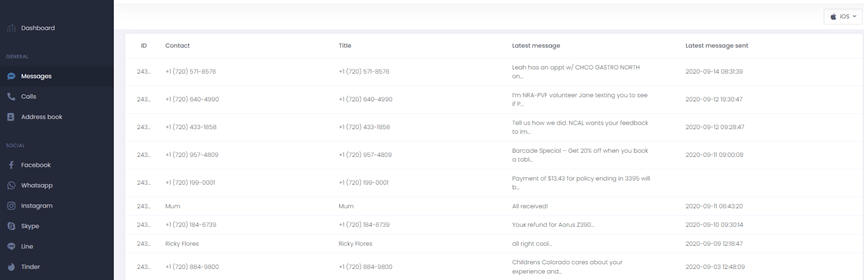
Message monitoring is one of the most sensitive parts of the service. It may expose conversations involving friends, relatives, teachers, and other people who never agreed to share their messages. Use it for a defined safety concern, not routine curiosity.
GPS location and location history
The location section places reported coordinates on a map and can retain a history of visited places. Accuracy depends on GPS reception, connectivity, permissions, battery settings, and how recently the phone synchronized. The company also advertises GeoFinder, which uses an SMS interaction for a location request. That is separate from continuous installed-app tracking.
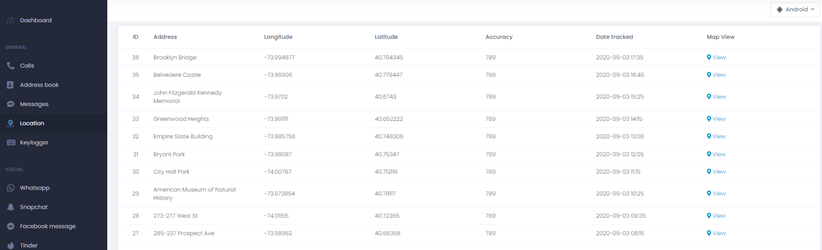
A map pin should not be treated as proof that a person is standing at an exact spot. Check the timestamp first. For ordinary arrival alerts and shared family location, a less intrusive locator may be enough.
Social apps and browser history
uMobix advertises monitoring for supported social and messaging apps, including activity from services such as WhatsApp, Facebook, Instagram, Telegram, Snapchat, and others. Coverage changes by operating system and app update. Android social reporting may use screenshots or captured activity rather than a direct connection to every service.
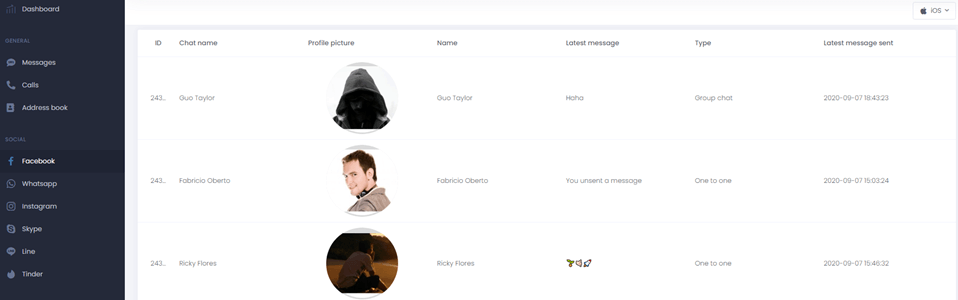
Browser reporting can include visited pages, searches, and usage records. Private or incognito browsing is not guaranteed to appear in every setup. Product pages tend to describe the maximum feature set, so the compatibility check matters more than the length of the feature list.
Keylogger, media, and device controls
The Android keylogger records typed input on supported keyboards and apps. It can capture private messages, searches, and passwords, which creates obvious security and privacy risks. Store the uMobix account behind a unique password and do not share dashboard access casually.
Other advertised Android tools include photo and video access, app lists, SIM-change alerts, website blocking, Wi-Fi blocking, call restrictions, app restrictions, and device blocking. Feature names can sound broader than the actual permission allows. Test the specific control you need during the eligible refund period and contact support promptly if it fails.
How to install uMobix on Android
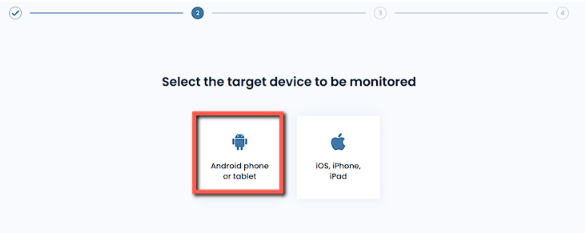
Android installation is not remote. The company says the subscriber needs physical access to the unlocked supervised phone, then follows the instructions displayed in the uMobix account. Setup may require allowing installation from outside the Play Store, granting sensitive permissions, and changing battery or security settings.
Security tools, operating system updates, factory resets, permission changes, and loss of internet access can interrupt data collection. The refund policy excludes several of those situations. Read the setup and compatibility material before paying rather than assuming support will convert an incompatible phone into a supported one.
uMobix pricing and refund policy
uMobix sells recurring subscriptions for one supervised device. The longer plans lower the monthly equivalent but require a larger payment upfront. Prices and checkout promotions can change, so confirm the billed total shown before submitting payment.
| Plan | Billed amount | Monthly equivalent | Device coverage |
|---|---|---|---|
| 1 month | $49.99 | $49.99 | 1 device |
| 3 months | $89.97 | $29.99 | 1 device |
| 12 months | $149.88 | $12.49 | 1 device |
Free Trial/ Refund: No standard free trial. Some orders may show a $0.99 one-day trial. Eligible first purchases can request a refund within 14 days.
14-Days Money-Back Guarantee
Customer support, cancellation, and uninstalling
uMobix lists email support, a contact form, telephone help, and online chat. The refund policy tells customers with technical problems to work with support before requesting money back. That requirement matters because refusing troubleshooting is one of the stated reasons a refund can be denied.
Subscribers can cancel or freeze renewal from the account area. Cancellation applies to the next billing cycle and does not normally reverse a payment already processed. Save the cancellation confirmation and check the next renewal date instead of assuming that deleting the monitored app cancels billing.
Removing uMobix from an Android phone requires access to the supervised device and may involve reversing the permissions changed during installation. Exact steps vary with the Android version and setup. After removal, log into the web account separately to review stored records, cancel the subscription if needed, and request deletion according to the current privacy options. Uninstalling the phone component and closing the billing relationship are different tasks.
The public policy pages contain some older dates and company details that do not perfectly match the current website footer. That does not make the service fake, but it is a reason to keep purchase receipts, read the checkout terms, and use written support channels for billing questions.
Is uMobix safe and legal?
uMobix is powerful enough to expose passwords, private messages, location history, photos, and social activity. That makes account security and lawful use part of the product decision. The company says the software is for devices you own, phones used by your children, or devices whose adult owner has given explicit permission.
Local law can set additional rules, especially for workplace monitoring, call recording, private communications, and monitoring an older teenager or another adult. A hidden icon does not create legal permission. If the law or consent position is uncertain, get qualified advice before installing the app.
Families that mainly need web filtering, app limits, and screen-time schedules should compare conventional parental control apps for iPhone and Android. Those products usually collect less private content than a full keylogger and message monitor.
Who should use uMobix?
uMobix makes the most sense for an Android household dealing with a defined safety problem that simpler tools have not solved. Examples might include repeated contact from an unsafe adult, a serious cyberbullying concern, or a missing-device situation where detailed records are proportionate and lawful.
It is a poor fit for buyers who want to track a phone from its number, install without access, monitor several devices under one plan, or obtain identical Android and iPhone features. Parents who mainly want shared location should start with less invasive tracking apps for Android and iPhone.
How we evaluated uMobix
This review separates what the company documents from what would require a controlled device test. I used the public dashboard demo to inspect navigation and report categories. I compared the main product page with the Android tracker page, recurring policy, refund policy, legal-use notice, and supplied interface screenshots.
I treated broad marketing phrases as claims, not measured results. Statements such as “real-time” location or five-minute updates depend on the phone and were not converted into guarantees. I also removed claims from the older source article about nationwide mobile coverage, data allowances, antivirus protection, technician visits, and identical iPhone functionality because those do not describe the current monitoring service accurately.
A physical-device review would still be needed to measure installation time, battery effect, GPS accuracy, alert delay, record completeness, and behavior after an operating system update. Those results could differ across phone models. The rating here reflects documented capability, transparency, purchase risk, platform clarity, privacy impact, and usefulness for the stated parental-safety purpose.
Final verdict: Is uMobix worth it?
uMobix is not a scam, but the purchase needs more care than the sales page suggests. It has a real dashboard, documented Android features, public support channels, and formal billing policies. It also renews automatically, covers one device, has a restrictive refund policy, and collects extremely sensitive information.
For authorized Android monitoring, uMobix is one of the more detailed options. For ordinary parenting, it may be too intrusive. Check compatibility, understand the billed total, read the refund exclusions, and decide which exact feature justifies collecting so much data before you subscribe.
14-Days Money-Back Guarantee