Key Takeaways: Spokeo checks public records tied to a phone number, mSpy tracks an authorized device after setup, and GEOfinder sends a consent-based location request. An IMEI alone cannot give consumers a live map. Use Find My or Find Hub first, then give the IMEI to your carrier and police.
A fake IMEI tracker can waste the first hours after a phone disappears, collect payment details, or expose the identifier to an unknown operator. Even a legitimate lookup may show hardware information without revealing the phone’s location.
I reviewed current product pages, billing terms, help centers, public demos, and official recovery guidance from Google, Apple, and India’s CEIR. I did not install monitoring software or test a lost phone. The article therefore separates documented functions from claims about accuracy, recovery speed, and battery use.
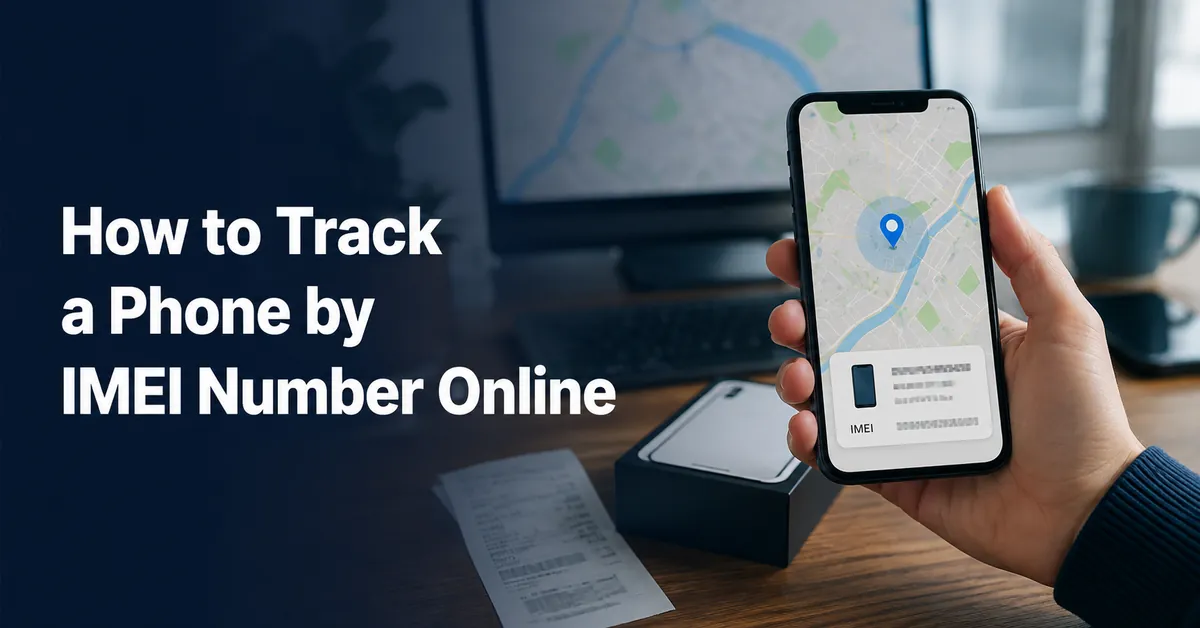
Can you track a phone using only its IMEI number?
No public consumer service can turn an IMEI into a live location. The 15-digit identifier tells a mobile network which handset is connecting. Carriers can use it to block a reported phone, and law enforcement may request network records during an investigation. Those records are not available to anyone who types an IMEI into a website.
For your own phone, start with Apple Find My or Google Find Hub. These services use an account, device settings, GPS, Wi-Fi, Bluetooth, and nearby devices. They do not locate the handset through the IMEI. Read our guide to phone-number location methods for the same distinction between voluntary sharing, account access, and carrier data.
Bottom Line: Use the IMEI as a hardware identifier in a carrier or police report. Use the phone’s existing Apple or Google account for the map. A public lookup can verify device details, but it cannot supply live cellular location data.
How to find your phone’s IMEI number
Record the IMEI before you need it and store it away from the phone. Dual-SIM devices may have two IMEI numbers, so save both.
- Dial *#06# on a phone you can still access. The identifier usually appears without placing a call.
- On iPhone, open Settings > General > About, then scroll to IMEI.
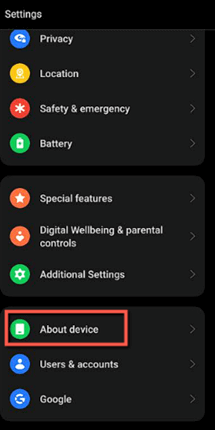
- On Android, open Settings > About phone. The exact menu name varies by manufacturer.
- Check the original box, purchase invoice, or carrier account when the phone is missing.
- In Google Find Hub, select the device and open Settings to view its IMEI when available.
IMEI-related tools and services: quick comparison
| Name | Best For | What It Can Do | Free Trial/Refund | Visit |
|---|---|---|---|---|
 Spokeo | US phone and identity research | Searches public and commercial records | 7-day introductory offer. | Visit |
 mSpy | Authorized parental monitoring | Location, geofences, and activity records | 14-day conditional refund. | Visit |
 GEOfinder | Consent-based location requests | Sends a link that requests location permission | 1-day trial for $0.99. | Visit |
 Intelius | US public-record searches | Phone, address, and identity reports | No standard free trial listed. | Visit |
| Google Find Hub | Recovering your Android device | Locate, ring, mark lost, or erase | Free with a Google Account. | Visit |
| IMEI.info | Checking device details | Shows available model, blacklist, or warranty records | Free basic lookup. | Visit |
Our testing methodology
I checked each service against the same questions: Does it locate a device, request a location, search public records, or only describe an IMEI? I reviewed official feature pages, help centers, compatibility notes, checkout disclosures, refund terms, and any accessible public demo. For Apple and Google recovery tools, I used current support documentation. I also reviewed CEIR instructions for Indian subscribers. I did not install the paid apps, submit an IMEI, purchase reports, contact support, or monitor a person. A demo can show layout and available categories, but it cannot prove GPS accuracy, update speed, battery drain, record freshness, or recovery success. I have not invented those results. Availability varies by country, device, operating system, plan, account access, permissions, network connection, and installation method. Monitoring belongs only on a device you own, a child’s device you may lawfully supervise, or an adult’s device with informed consent.
Best tools and services connected with IMEI tracking
1) Spokeo
Spokeo searches US public and commercial records using a phone number, name, email address, or street address. Its useful role in a lost-phone case is limited to researching an unfamiliar number or checking contact information. The service does not accept an IMEI as a GPS command, follow a handset on a map, or give access to carrier tower data.
Search results may be old, incomplete, or tied to a previous number owner. Confirm any useful lead through another source before acting. Spokeo also states that it is not a consumer-reporting agency, so its reports cannot be used for employment, housing, credit, insurance, or other regulated eligibility decisions.
Features
- Reverse Phone Search: A US number may return possible names, addresses, carriers, or related public information.
- Email Lookup: Available records can add identity context when an unfamiliar email address appears in a device account.
- Name Filters: Location and age details help narrow results when several people share a similar name.
- Address Records: Searches may show associated residents or property information, subject to record age and accuracy.
- Report Monitoring: Account alerts may flag newly added information in an existing report.
- No Device Installation: A lookup runs in the browser without adding software to another person’s phone.
Pros
- No access to the missing handset is required for a search.
- Several lookup routes support different identity-checking needs.
- I found its boundary from live tracking easy to establish.
- Search filters can reduce obvious common-name mismatches.
Cons
- Records may be incomplete, outdated, or attached to another person.
- I found recurring terms less simple than the initial offer.
- The service provides no live GPS or IMEI location data.
Pricing
Spokeo may start with a $0.95 seven-day introductory offer before converting to recurring membership billing.
| Plan | Billing | Access |
|---|---|---|
| Seven-day offer | $0.95 introductory charge | Search access |
| Recurring membership | Current price shown at checkout | Ongoing reports |
Free Trial/ Refund: Limited previews may be free. The $0.95 offer can convert to a recurring membership unless canceled. Checkout and billing-channel terms control refund eligibility.
Bottom Line: Spokeo can add public-record context to a phone number connected with a loss or scam concern. It does not locate the handset. Treat every match as a lead, watch the renewal terms, and use the carrier or device account for recovery.
7-day introductory offer.
2) mSpy
mSpy is monitoring software for a phone that has been set up through an authorized installation or account connection. Its documented features include current location, geofences, calls, messages, browsing, applications, media, and selected social platforms. It does not locate an arbitrary device after someone enters its IMEI.
Android and iPhone use different setup paths and expose different data. Check the exact model, operating system, and installation method before paying. Detailed monitoring should address a defined family-safety need and remain limited to a device you own, a child’s device you lawfully manage, or an adult’s phone with informed consent.
Features
- Location Boundaries: Geofences connect location records with family places such as home, school, or approved activities.
- Current Location: Available positions depend on permissions, connectivity, account status, and the selected setup method.
- Activity Dashboard: Supported calls, messages, browsing, applications, and media appear in one online account.
- Keyword Alerts: Selected terms can focus attention on a stated safety concern instead of constant reading.
- Platform-Specific Setup: Android, iCloud, and computer-assisted iPhone routes provide different records and requirements.
- Family Option: Standard plans cover one device, while a separate family package may cover additional phones.
Pros
- Geofences turn location records into useful place-based alerts.
- Several supported activity categories share one dashboard.
- I found current subscription totals published clearly.
- Multiple setup paths cover both major mobile platforms.
Cons
- iPhone coverage changes substantially with the synchronization method.
- I found one-device plans expensive for larger households.
- Detailed monitoring can collect more personal data than needed.
Pricing
mSpy starts at $48.99 for one month, while longer terms are prepaid at lower monthly equivalents.
| Plan | Total Billed | Devices |
|---|---|---|
| One month | $48.99 | One |
| Three months | $83.97 ($27.99 monthly equivalent) | One |
| 12 months | $139.92 ($11.66 monthly equivalent) | One |
Free Trial/ Refund: No functional free trial is listed. Eligible refund requests must be submitted within 14 days and meet the published policy conditions.
Bottom Line: mSpy suits authorized parental monitoring when location and selected activity records need to share one account. Its setup must happen before a phone disappears. It cannot find a new device from an IMEI, and its data collection calls for narrow use and clear rules.
14-day conditional refund.
3) GEOfinder
GEOfinder sends a location-request link to a phone number. The recipient must open the message and allow browser location access before the sender can receive a map point. The service works through consent and interaction rather than through the IMEI or private carrier systems.
This approach can help with an agreed check-in when installing a family app is impractical. It cannot silently recover a stolen phone, and a thief has no reason to approve the request. The result also depends on message delivery, browser permissions, network access, and the phone’s available location signals.
Features
- Permission-Based Request: A position appears only after the recipient opens the link and approves location access.
- No Recipient App: The recipient can respond in a compatible browser without installing dedicated monitoring software.
- Cross-Platform Access: Requests can reach supported Android and iPhone browsers through ordinary messaging.
- Custom Message: The sender can identify themselves and explain why the location is being requested.
- Request Dashboard: The account organizes sent messages and any locations recipients choose to share.
- Number Coverage: The vendor lists international support, subject to carrier delivery and recipient participation.
Pros
- No app needs installation on the recipient’s phone.
- The recipient controls whether location permission is granted.
- I found the one-day trial terms published plainly.
- Browser delivery supports mixed phone brands.
Cons
- No location appears without recipient action and permission.
- I found renewal pricing less prominent than the trial.
- The service cannot recover an uncooperative stolen phone.
Pricing
Access begins with a $0.99 one-day paid trial that requires billing details and can renew automatically.
| Plan | Billing | Access |
|---|---|---|
| One-day trial | $0.99 | One account |
| Recurring plan | $49.99 per 28-day cycle | One account |
Free Trial/ Refund: There is no free plan. The $0.99 trial lasts one day and renews unless canceled. Refunds are limited by the published policy.
Bottom Line: GEOfinder can handle a transparent, one-time location request across phone brands. It relies on the recipient opening a link and granting permission, which makes it unsuitable for secret tracking or stolen-phone recovery. Cancel promptly if you do not want the recurring plan.
1-day trial for $0.99.
4) Intelius
Intelius searches US phone, name, address, and public-record data. In this guide, its place is identity research around a phone number linked to a loss, suspicious contact, or possible resale listing. The service does not query cellular towers, locate an IMEI, or follow a device.
A report may contain old addresses, incomplete entries, or a match for someone with a similar name. Keep it as a research lead. Intelius also limits the use of its reports in decisions covered by consumer-reporting law, including employment, housing, credit, and insurance.
Features
- Reverse Phone Reports: A US number may connect with possible owners, addresses, carriers, and related records.
- People Search: Name and location details help narrow possible matches across available public information.
- Address Lookup: A street address may reveal associated residents, property details, or older connections.
- Identity Cross-Checks: Related names, relatives, emails, or prior locations can help test whether a match is plausible.
- Browser Reports: Research happens online without touching or installing software on the missing device.
- Use Restrictions: Published terms separate personal research from regulated consumer-eligibility decisions.
Pros
- No target-device access is needed for public-record research.
- Several search routes allow broader identity cross-checking.
- I found the lack of live tracking straightforward to confirm.
- Thirty-day and 60-day options fit different research periods.
Cons
- The service cannot show live movement or precise device coordinates.
- I found complete public pricing details difficult to confirm.
- Records may be stale, incomplete, or matched incorrectly.
Pricing
Membership access starts at $25.11 every 30 days, with automatic renewal until canceled.
| Plan | Billing | Access |
|---|---|---|
| 30-day membership | $25.11 every 30 days | Recurring reports |
| 60-day membership | $42.69 every 60 days | Recurring reports |
Free Trial/ Refund: No permanent free plan or standard free trial is listed. Promotions vary, and refund eligibility depends on the purchase and billing terms.
Bottom Line: Intelius can research a US phone number or public identity detail connected with a lost device. It cannot locate the handset. Confirm every result, review recurring billing before purchase, and keep the report out of regulated eligibility decisions.
No standard free trial listed.
5) Google Find Hub
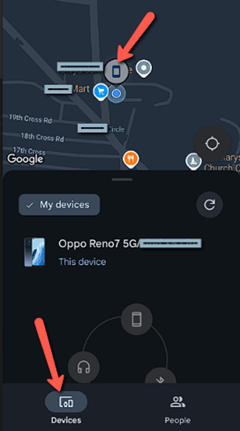
Google Find Hub is the first place to check for an Android phone already linked to your Google Account. It can show an available current or last known location, play a sound, mark the device as lost, display contact information, or erase it. The map comes from account and location services, not from entering the IMEI.
Google says the device generally needs power, connectivity, a signed-in account, Find Hub enabled, and visibility on Google Play. Supported phones can also use encrypted recent locations or the Find Hub network. After an erase, the phone’s location stops appearing, so treat that option as a last step.
Features
- Account-Based Map: Select a device already tied to the signed-in Google Account and review its available location.
- Play Sound: Ring a nearby phone at full volume for five minutes, even when it is set to silent.
- Mark as Lost: Lock the phone and add contact information to help a finder return it.
- Recent Location: Encrypted stored locations may provide a useful point when the current position is unavailable.
- Remote Erase: Delete data when recovery appears unlikely, knowing that future location access will end.
- IMEI Display: Device settings in Find Hub can show the identifier needed for a carrier report.
Pros
- The service is free for supported Google Account devices.
- Location, ringing, locking, and erasing share one screen.
- I found the official setup requirements clearly documented.
- Guest mode can help a friend sign in safely.
Cons
- Location can fail when power, connectivity, or settings are unavailable.
- I found some offline features limited to supported hardware.
- Remote erasure ends later location access through Find Hub.
Pricing
Google Find Hub is free for supported devices linked to a Google Account.
| Plan | Price | Access |
|---|---|---|
| Google Find Hub | Free | Supported linked devices |
Free Trial/ Refund: No trial or refund applies because the device-finding service is free.
Bottom Line: Google Find Hub is the best first step for your missing Android phone because it uses the account already connected to the device. Its results depend on prior setup and available signals. Retrieve the IMEI from its settings when you need to call the carrier.
Free with a Google Account.
6) IMEI.info
IMEI.info is a device-information lookup service. An IMEI check may identify the manufacturer, model, basic specifications, and available blacklist or warranty details. Those records can help verify a secondhand phone or describe a missing device more accurately in a report.
The service does not supply a live location. Blacklist coverage and paid checks vary by device, carrier, country, and data source. Never treat a clean result as proof that a phone is legitimate, and avoid posting an IMEI publicly when asking for help.
Features
- Model Identification: Basic checks can match an IMEI with a manufacturer and device model.
- Specification Records: Available reports may show hardware details useful for identifying a handset.
- Blacklist Checks: Selected services can report whether a participating database lists the device as lost or stolen.
- Warranty Information: Some paid checks provide coverage or activation details for supported brands.
- Browser Access: The lookup works online without installing software on the phone.
- Customer Support: The site provides contact channels for account and paid-check questions, though I did not test response times.
Pros
- Basic device identification is available without phone installation.
- Blacklist information can support a secondhand purchase check.
- I found the live-location limit clear during review.
- Brand-specific checks cover several device information categories.
Cons
- The service cannot locate a handset on a map.
- I found paid-check pricing dependent on the selected service.
- Blacklist coverage may not include every country or carrier.
Pricing
Basic device information may be free, while extended reports show their price before payment.
| Check | Price | Access |
|---|---|---|
| Basic IMEI lookup | Free where available | Model and device details |
| Extended checks | Shown for the selected report | Brand or database-specific details |
Free Trial/ Refund: Basic checks may be free. Paid report prices and refund rules depend on the selected service.
Bottom Line: IMEI.info can identify hardware and check selected status records, which may help with a purchase or police report. It cannot track location. Check the scope and price of any extended report before paying, and confirm important results with the carrier.
Free basic lookup.
Contact your mobile carrier
Call the carrier as soon as theft looks likely. Ask it to suspend the SIM or eSIM and block the handset’s IMEI where supported. Have the account PIN, phone number, IMEI, model, proof of purchase, and police report number ready. A carrier may see network activity that ordinary users cannot, but it generally will not release another person’s live tower location to you. Compare recovery and family-safety options in our guide to GPS phone tracker apps.
File a police report for a stolen phone
Give police the IMEI, serial number, phone model, proof of ownership, last known location, and any account screenshots. Keep the report number for the carrier and insurer. Do not travel alone to a map pin or confront a suspected thief. Law enforcement decides whether the case supports a carrier request. A public IMEI lookup cannot replace that process. For routine family coordination, use a visible option from our location tracking app comparison.
Use CEIR to block a lost phone in India
India’s Central Equipment Identity Register lets subscribers request an IMEI block after a phone is lost or stolen. The official process requires a police complaint, a reissued SIM for OTP verification, identity proof, and device details. A purchase invoice is optional but useful. Submit the request through CEIR and save the Request ID. CEIR states that a successful block should stop the phone from using Indian mobile networks while preserving police traceability. If the phone is recovered, report that to police and request unblocking. Families comparing ongoing supervision tools can also review our family tracking app guide.
Verdict
Track your own Android phone through Google Find Hub or an Apple device through Find My. Use the IMEI when you call the carrier, file a police report, or submit a CEIR block request in India.
- Spokeo is useful for US public-record research tied to a phone number, not device tracking.
- mSpy fits authorized monitoring set up before a phone goes missing, with platform-specific limits.
- GEOfinder works for a transparent location request when the recipient opens the link and permits access.